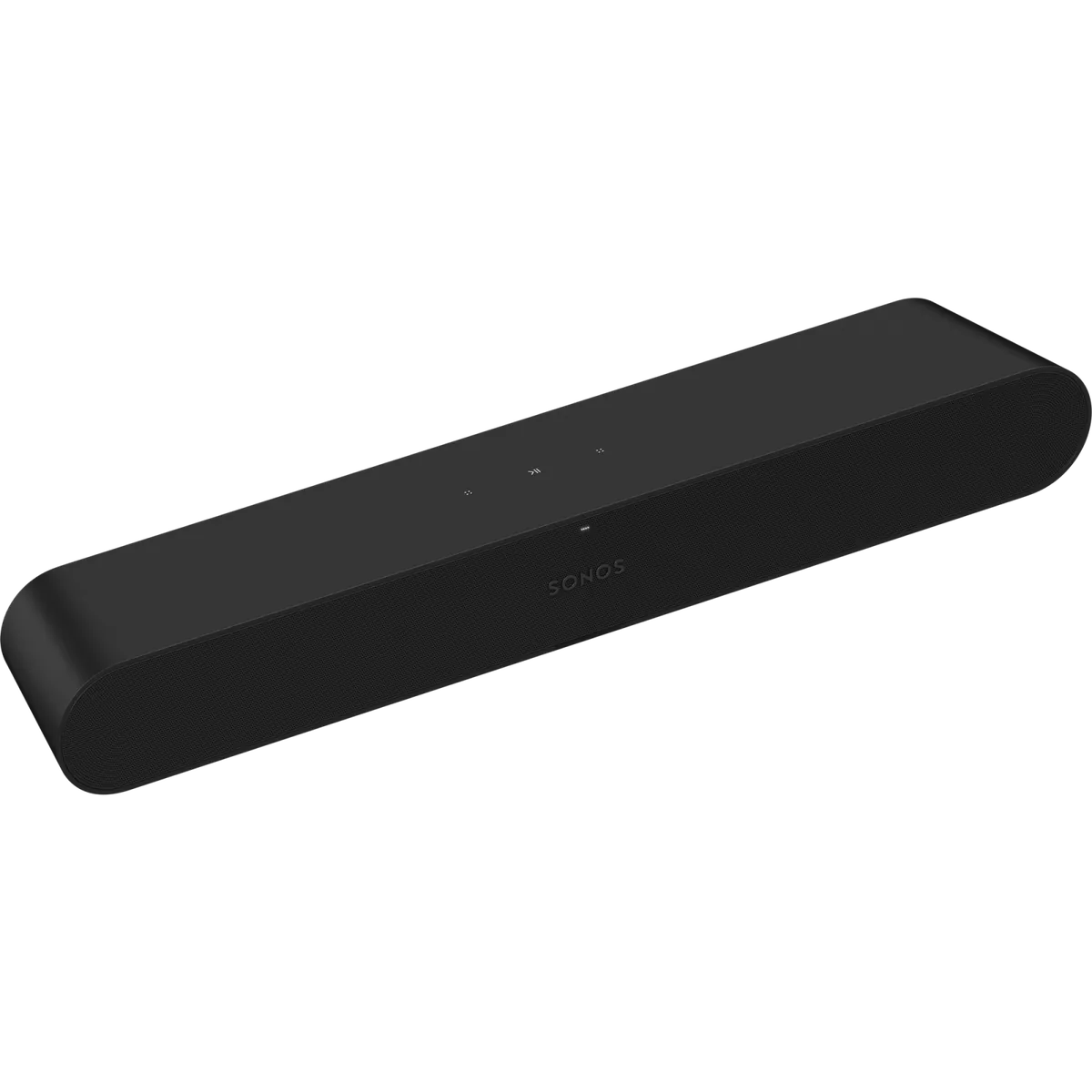
The Sonos Ray looks like a small, modern soundbar, but its TV connection is optical only: there is no HDMI ARC or eARC input. That limitation is frustrating for some setups and useful for others. If an older or inexpensive TV has an optical output but scarce HDMI ports, Ray can improve dialogue without taking an HDMI connection away from a console or streaming box. If you want Dolby Atmos, HDMI control, Bluetooth, or deep bass from one box, this is the wrong Sonos bar. Sonos lists the Ray at $219 on its U.S. shop at the time of writing, so the decision is about fit and ecosystem as much as sound quality.
Table of Contents
What are the Sonos Ray's main strengths and limits?
Ray is a sensible compact soundbar for a small room, bedroom TV, or older television with optical output. It has four drivers, clear midrange reproduction, Speech Enhancement, Night Sound, AirPlay 2, Trueplay room tuning on iOS, and access to Sonos multi-room playback. It does not have HDMI, Dolby Atmos, Bluetooth, a discrete center channel, or a battery. It can become part of a 5.1 Sonos home-theater setup with a Sub and two compatible speakers, but that expansion can cost much more than the bar itself.
| Best fit | Small rooms, compact TVs, dialogue-heavy viewing, and existing Sonos homes |
|---|---|
| TV connection | Optical digital audio only; TV must have optical output |
| Audio formats | Stereo PCM, Dolby Digital, and DTS Digital Surround; no Dolby Atmos |
| Wireless | Wi-Fi, AirPlay 2, Spotify Connect, and Sonos app; no Bluetooth |
| Size and weight | 70 x 557 x 93 mm; about 1.9 kg / 4.19 lb |
| Current U.S. listing | $219 on Sonos’s shop when checked September 12, 2026 |
Will the optical-only Sonos Ray work with my TV?
Sonos gives Ray one physical TV input: optical. The official Ray guide says to connect the included optical cable to the TV’s optical digital-out port, then use the Sonos app for setup. The television or PC needs an optical output, and Sonos says the remote must be infrared-enabled for remote syncing. Ray learns the remote’s volume commands during setup, so there is no separate soundbar remote to keep track of.
HDMI ARC/eARC is the more familiar modern connection and carries control signals alongside audio. Ray does not offer it. On an older TV with one HDMI ARC socket and several devices competing for limited ports, however, optical can be the cleaner choice. TechRadar’s 2025 Ray feature makes exactly that case: the author wanted to preserve HDMI ports for 4K HDR devices and appreciated Ray’s optical connection and remote-learning setup.
Check this before buying. A TV with no optical output is not a small inconvenience; it is an incompatibility unless you add a separate converter. Also check the TV stand. Sonos recommends at least 50 mm between Ray and the TV, keeping the IR sensor clear, leaving room above for touch controls, and keeping the ends clear of obstructions.
How does the Sonos Ray sound, and what room size suits it?
Ray’s strengths are voices and controlled, compact presentation. Sonos uses two tweeters, two midwoofers, four Class-D amplifiers, and a bass-reflex system. The company also provides Speech Enhancement and Night Sound in the app. Those features target real living-room problems: voices that disappear into background music and loud effects that wake everyone up at night.
RTINGS’ exact-model review calls Ray acceptable for mixed use and particularly useful for dialogue-heavy shows and podcasts. It reports clear vocal reproduction and balanced mids, while noting the lack of low-bass rumble and the absence of a discrete center channel. For movies, RTINGS says Ray can receive 5.1 Dolby Digital and DTS content but downmixes it to stereo as a standalone bar; it does not support Dolby Atmos.
The Ambient’s review by Simon Lucas found direct, detailed sound and more heft than a typical TV, but described the soundstage as small-scale. It also heard treble as restrained and found the balance less convincing when the bar neared maximum volume. That lines up with the product’s intended use: a compact TV improvement, not a substitute for a wide front stage and subwoofer in a large cinema room.
Room size should guide the purchase. In a bedroom, apartment, or small living room, Ray’s modest dimensions and forward-facing acoustic design are convenient. In a wide room with seats far to the sides, or for someone who watches action films at high volume, the limited low end and stereo width will show sooner. Adding Sonos surrounds and a Sub can address some of that, but it changes the budget substantially.
What Sonos features does the Ray have, and can you expand it?
Ray joins a Sonos system over Wi-Fi and can stream music when the TV is off. Sonos supports AirPlay 2, Spotify Connect, the Sonos app, bass/treble/loudness adjustments, Speech Enhancement, Night Sound, and Trueplay room tuning with a supported iOS device. The bar itself has touch controls and an IR receiver; it is not a Bluetooth speaker and it has no built-in voice assistant.
The official guide says you can expand Ray with a Sub and two Sonos speakers such as Ones for 5.1 surround sound. That is a useful route for an existing Sonos owner who wants to start small. It is less persuasive as a new purchase plan if the intended end state is an expensive surround system. RTINGS makes the same cost point in practical terms: the optional subwoofer and rear speakers improve the experience, but the extras are not cheap.
Do not confuse grouping rooms for surround sound. Sonos’s guide separates multi-room grouping from the surround setup. A pair of speakers grouped with Ray for music is not automatically a rear-channel home-theater system. The app’s Add Surrounds workflow is the relevant path.
What are the Sonos Ray's specs, and where should you place it?
Sonos lists Ray at 70 mm high, 557 mm wide, and 93 mm deep, with a weight of about 1.9 kg (4.19 lb). It is available in matte black or matte white. The guide specifies Wi-Fi on 2.4 and 5 GHz networks, optional Ethernet, optical TV input, and IR remote control. Supported home-theater formats are Stereo PCM, Dolby Digital, and DTS Digital Surround; Sonos cautions that the format list does not itself indicate a licensed decoder.
The bar’s compact size makes shelf placement straightforward, but height still matters. A bar over 7 cm tall can cover the bottom edge of some TVs if the stand is low. Sonos’s placement advice is worth following: leave space above the bar for the touch controls and keep the IR sensor and both ends unobstructed. Wall mounting is available with a separate Ray mount.
What do independent reviews say about the Sonos Ray?
Across the independent coverage, the pattern is consistent: strong dialogue intelligibility and easy setup, with smaller-scale sound, no Atmos, no HDMI, and limited bass. RTINGS specifically compares Ray with the Sonos Beam and finds Beam better for movies because it has a 3.0 layout, HDMI, a wider soundstage, and more low-end extension. The Ambient places Ray below Beam and Arc in sound scale while praising its neat design and integration. TechRadar’s later use-case article is more enthusiastic when the buyer has an older TV and wants to preserve HDMI ports.
Current owner discussion is too small to call a consensus. In one recent Ray-versus-Beam thread, a commenter who says they install Sonos for work preferred the Beam and found Ray barely better than TV speakers. Another Ray owner asked about adding Sonos One surrounds, while a separate buyer was considering a used Ray at $75 for a smaller high-ceilinged room. Those are isolated questions and opinions, not a representative test panel.
Who Should Buy the Ray?
Buy Ray when the optical input solves a real TV problem, your room is compact, and you value Sonos’s app, AirPlay 2, Trueplay, or future expansion. It is also a reasonable first Sonos home-theater product if you understand that adding surrounds or a Sub will cost extra. At the current U.S. listing price, it is easier to justify as a clean, compact upgrade than as the foundation of a full cinema system.
Skip it for a TV without optical output, HDMI ARC/eARC convenience, Dolby Atmos, Bluetooth playback, strong standalone movie bass, or a large open room. Compare the wider soundbars section before committing, and if you are pairing it with Sonos speakers, our Sonos Era 300 review provides useful context about the ecosystem’s more ambitious speaker options.
Frequently Asked Questions
Does Sonos Ray have HDMI ARC?
No. Ray connects to a TV with an optical digital audio cable. The TV must have an optical output.
Does the Sonos Ray support Dolby Atmos?
No. Sonos lists Stereo PCM, Dolby Digital, and DTS Digital Surround for Ray. Atmos is not supported.
Can Sonos Ray use a TV remote?
Yes, with an infrared-enabled TV remote. During setup, Ray learns the remote’s volume commands.
Does Ray support Bluetooth?
No. Ray is a Wi-Fi Sonos product. Music playback uses the Sonos app and services such as AirPlay 2 and Spotify Connect.
Can I add surrounds and a Sub?
Yes. Sonos says you can expand Ray with a Sub and two compatible Sonos speakers for 5.1 surround sound. Budget for those additions separately.
What do the Sonos Ray's numbers mean for your setup?
A few figures decide whether Ray fits your TV, stand and budget. Check them before you buy.
- Sonos recommends at least 50 mm between Ray and the TV, so measure your stand first.
- Ray is 70 mm high, so check that it clears the bottom of your TV on a low stand.
- The guide says Ray expands to 5.1 surround with a Sub and two Sonos speakers, at extra cost. (sonos.com)
- RTINGS says Ray receives 5.1 Dolby Digital and DTS but downmixes it to stereo as a standalone bar. (rtings.com)