The JBL Bar 500 is a good 5.1 soundbar with a wireless 10-inch subwoofer, clear dialogue and deep bass, but it has been replaced. Buy one only if you find a complete unit well below the price of its successor, the Bar 500MK2, or if you specifically need 4K/120Hz video passthrough through the bar.
JBL's official Bar 500 page showed the original model as sold out in October 2026, while the JBL Bar 500MK2 was in stock. RTINGS found the MK2 louder and warmer, with much lower audio latency and DTS playback the original lacks. The Bar 500 keeps one advantage: 4K at 120Hz passthrough on its HDMI input.
The other thing to know before buying: "Dolby Atmos" here means processing, not height speakers. The bar has no up-firing drivers, and RTINGS says it has to downmix height content. ArmorSound has not tested this soundbar in person; this review relies on JBL's documentation and published lab and listening reviews.
Good bass and dialogue, but the MK2 has replaced it
RTINGS found clear dialogue and extended low bass, but the original Bar 500 has no height drivers, no DTS and weak lip sync. Buy it only complete and well below a new Bar 500MK2, or if you need 4K/120Hz passthrough.
- Discounted, complete open-box or used units
- TV rooms that want a real subwoofer
- Consoles passing 4K/120Hz through the bar
- You want overhead Atmos effects
- You watch DTS discs
- The price is close to a new Bar 500MK2
Where to buy
 Our verdict
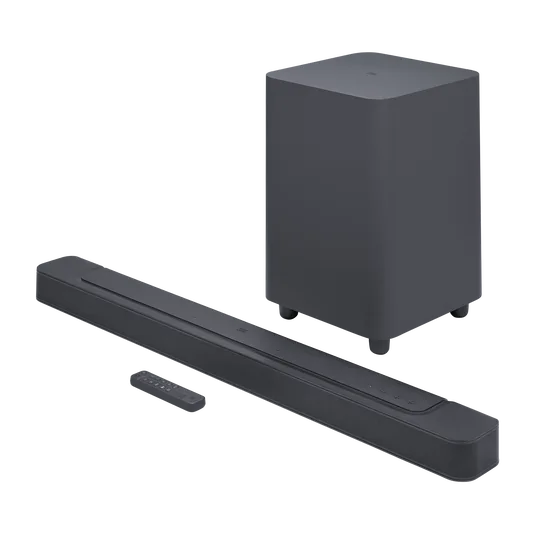
JBL Bar 500
Best for: Bargain 5.1 setups with a real sub
- System
- 5.1 with wireless 10-inch sub
- Power
- 590W total
- TV inputs
- HDMI eARC, HDMI in, optical
- Atmos
- Virtual, no up-firing drivers
- Status
- Sold out at JBL US; MK2 replaces it
- Extended low bass from the 10-inch sub, per RTINGS
- Clear dialogue from a discrete center channel
- 4K/120Hz HDMI passthrough
- AirPlay, Chromecast built-in and room calibration
- No height drivers; Atmos is virtual
- No DTS support
- Sub-par lip-sync latency over HDMI
Watch for: Listings often mix up the Bar 500 and Bar 500MK2, so confirm the model and the included remote, HDMI cable and brackets before you pay.
Check price on Amazon →What are the JBL Bar 500 key specs?
| Spec | JBL Bar 500 |
|---|---|
| Channels | 5.1 (soundbar plus wireless subwoofer) |
| Total power | 590W (290W bar, 300W sub), max at 1% THD |
| Bar drivers | Four 46 x 90 mm racetrack drivers, three 0.75-inch tweeters |
| Subwoofer | Wireless, 10-inch driver, 22 lb |
| Frequency response | 35Hz to 20kHz (-6dB) |
| TV connections | HDMI eARC, one HDMI input, optical |
| Video passthrough | 4K/120Hz (RTINGS); HDR10 and Dolby Vision (JBL) |
| Audio formats | Dolby Atmos (virtual), Dolby Digital, multichannel PCM; no DTS |
| Wireless | Wi-Fi 6, Bluetooth 5.0, AirPlay, Chromecast built-in, Alexa Multi-Room Music |
| Bar size and weight | 40 x 2.2 x 4 in; 6.2 lb |
How good are the JBL Bar 500 bass and dialogue?
Bass is the easiest win. JBL rates the frequency response down to 35Hz, and RTINGS reports extended low bass, calling the system a good fit for EDM, hip-hop and action movies. The 10-inch wireless sub does the heavy lifting, so the bar's small drivers do not have to.
Dialogue is the second strength. RTINGS credits the discrete center channel and an even mid-range for speech that is easy to follow, and JBL's PureVoice dialogue enhancement switches on by default for TV and HDMI sources. Stereowise Plus reached a similar conclusion in its listening review, describing vocals as smooth and easy to understand and the sub as having plenty of authority.
The sub's level sits at 3 by default. RTINGS suggests dropping it to 2 for a more neutral balance with music, which is also the first thing to try if the bass is too boomy in a small room or bothering neighbors. Our subwoofer guide covers placement if the bass sounds uneven from your seat.
At the top end, RTINGS says the Bar 500 gets loud enough for large, open spaces but compresses bass at maximum volume. The MK2 measured with little to no compression, which is one of the clearest upgrades.
What Dolby Atmos and surround sound do you actually get from the JBL Bar 500?
JBL's manual calls the Bar 500's approach "Virtual Dolby Atmos," using Dolby's surround upmixer, and lets you switch the effect on or off. RTINGS’ Bar 500 test found no dedicated height channels, so overhead effects get folded into the front and surround channels instead of coming from above.
There are no rear speakers either. RTINGS says the bar simulates surround by beaming effects from drivers in the bar itself, which sounds less convincing than real satellites. Stereowise Plus still described an extremely wide soundstage, with effects bouncing off the room's walls.
Smart Mode is the setting to understand. It is on every time the bar powers up, and RTINGS liked it for movies with height content because it widens the sound. With music, though, RTINGS heard a forced, fake quality, and with Dolby Digital and Dolby Digital Plus it found that effects meant for one side played on both. Turn it off for music, and try both settings with your favorite films.
If convincing overhead sound is the goal, you need up-firing drivers. Our Dolby Atmos soundbars list covers models that have them, such as the Klipsch Flexus Core 200 below.
How does the JBL Bar 500 handle TV connection, video passthrough and lip sync?
The recommended connection is HDMI eARC, which JBL's manual says gives the best Dolby Atmos result; it also tells you to enable HDMI-CEC and ARC on the TV first. JBL includes a 1.2-meter HDMI cable. Optical works as a fallback, but if both are connected the HDMI path takes priority.
The HDMI input is the Bar 500's last real advantage. RTINGS measured 4K at 120Hz passthrough with 4:2:0 chroma and some variable refresh rate support, so a console can run through the bar. The MK2 tops out at 4K/60Hz, according to RTINGS. If your TV has spare HDMI 2.1 ports, this matters less, because you can plug the console into the TV and let eARC carry the audio.
Latency is the weak spot. RTINGS rated it sub-par over HDMI In and ARC and mediocre over optical, and advises using the Audio Sync setting in the JBL One app to line up voices with lips. Our audio latency guide explains why delays vary by TV and app.
How do setup, the app and streaming work on the JBL Bar 500?
Setup runs through the JBL One app. The Bar 500 owner manual walks through Wi-Fi setup, Chromecast and AirPlay streaming, and sound calibration, which you start from the CALIBR button on the remote. Run calibration once the bar and sub are in their final spots.
The app gives you a 3-band EQ, room correction and a sub level control, per RTINGS. JBL says Wi-Fi also delivers automatic software updates. There is no built-in voice assistant, though an Alexa-enabled device can stream to it through Alexa Multi-Room Music.
Physically, RTINGS notes the 40-inch bar is too wide to sit between the feet of a 55-inch TV stand, though it is low enough not to block the screen. The sub is about the size of a desktop PC, so measure your floor space before you buy.
What should you check when buying a Bar 500 now?
With JBL's own stock gone, most Bar 500s will be retailer leftovers, open-box or used units. Before you pay:
- Confirm the model name on the listing photos. The MK2 has a darker finish, a rounded subwoofer and a pill-shaped remote, per RTINGS.
- Check the box contents against RTINGS's list: remote with batteries, HDMI cable, two power cables, mounting brackets, screws and a template.
- Ask the seller to confirm the sub pairs and the bar joins Wi-Fi, since streaming and software updates depend on that connection.
- Compare the final price with a new Bar 500MK2. If the gap is small, the newer model is the better buy.
What do JBL Bar 500 owners report?
Spec sheets and lab reviews only go so far. Here is what owners say after living with it, drawn from their own posts on Reddit.
- The sub shakes the house. A recent buyer says the subwoofer packs a punch and their house shakes. (r/Soundbars)
- Punchy, if not the deepest. An owner of both a JBL Bar 5.1 and a Bar 500 says the 5.1 digs deeper but the Bar 500 bass is still pretty punchy. (r/Soundbars)
- Right-sized for apartments. An apartment owner who paid $340 keeps the volume and bass low in a bedroom of roughly 20 by 25 feet and says it is all they could want. (r/Soundbars)
- Mids that settle in. One owner almost sent it back because the mids sounded muddy, but says voices cleared up after about a week of use. (r/Soundbars)
- Or a return. Another buyer returned their Bar 500 after three days: they loved the bass but said voices sounded like they came from behind a wall. (r/Soundbars)
- Big rooms over small ones. An owner of both the Bar 500 and a Sonos Beam Gen 2 with Sub Mini prefers the JBL in a huge room and the Sonos in a small or medium one. (r/Soundbars)
Owners agree on the bass. Dialogue clarity is the recurring complaint, so check the Pure Voice setting and your TV audio output before you judge it.
Who should buy the JBL Bar 500, and who should skip it?
Buy it if:
- You find a complete Bar 500 at a clear discount to the MK2.
- You want a real subwoofer and clearer TV dialogue without running wires to rear speakers.
- You route a 4K/120Hz console through the soundbar.
Skip it if:
- You want overhead Atmos effects. Look for up-firing drivers.
- Lip sync bothers you or you watch a lot of DTS discs.
- Your room is small or shared walls make a 10-inch sub a liability. A compact all-in-one bar is easier to live with.
What are the alternatives to the JBL Bar 500?
| Feature | JBL Bar 500 | JBL Bar 500MK2 | JBL Bar 300MK2 | Klipsch Flexus Core 200 |
|---|---|---|---|---|
| Channels | 5.1 | 5.1 | 5.0 | 3.1.2 |
| Subwoofer | Wireless 10-inch | Wireless 10-inch | None | Dual 4-inch built in; optional Flexus subs |
| Total power | 590W | 750W | 450W | Not listed |
| Up-firing drivers | No | No | No | Yes, two 2.25-inch |
| DTS | No | DTS Virtual:X | DTS Virtual:X | Not listed |
| Status (Oct 2026) | Sold out at JBL US | In stock at JBL US | In stock at JBL US | Current Klipsch model |
JBL Bar 500MK2. The default choice. JBL rates it at 750W with a 37-inch bar and the same 10-inch sub size. RTINGS measured eARC latency under 100 ms, little compression at full volume and DTS playback, and the app adds a 7-band EQ. Like the original, it has no up-firing drivers, and passthrough stops at 4K/60Hz.
JBL Bar 300MK2. The all-in-one option for smaller rooms or apartments where a separate sub causes trouble. JBL lists 450W across five channels in a 37-inch bar, with no separate subwoofer. Our JBL Bar 300 review covers the original version, which JBL's US store now sells only refurbished.
Klipsch Flexus Core 200. The pick for real height effects. Klipsch lists a 3.1.2-channel layout with two 2.25-inch up-firing height drivers, a dedicated center tweeter and dual 4-inch built-in woofers, and you can add Flexus surrounds and subs later. Read our Klipsch Flexus Core 200 review.
For a small bedroom TV, a simpler bar like the one in our Bose TV Speaker review may be all you need.
Frequently asked questions
Does the JBL Bar 500 have true Dolby Atmos?
It decodes Dolby Atmos but has no up-firing or height drivers. JBL's manual describes the feature as virtual Dolby Atmos created with Dolby's upmixer, and RTINGS says the bar has to downmix height content. You get a wider front and side presentation, not sound that seems to come from the ceiling. For that, choose a bar with dedicated up-firing drivers.
Is the JBL Bar 500 discontinued?
JBL's US product page listed the original Bar 500 as sold out in October 2026, while the Bar 500MK2 was in stock. Remaining units are mostly retailer leftovers, open-box and used systems. Check that the listing is the model you want, that the remote, HDMI cable and mounting hardware are included, and that the price undercuts a new MK2.
What is the difference between the JBL Bar 500 and Bar 500MK2?
Both are 5.1 systems with a 10-inch wireless sub and no up-firing drivers. RTINGS found the MK2 louder and warmer, with much lower latency, DTS playback and a 7-band EQ. JBL rates the MK2 at 750W versus 590W. The original Bar 500 keeps 4K/120Hz passthrough, while the MK2 is limited to 4K/60Hz.
Does the JBL Bar 500 support DTS?
No. JBL's own FAQ says the Bar 300 and Bar 500 do not support DTS and lists Dolby Atmos, Dolby Digital and multichannel PCM. If you watch DTS Blu-rays, set your player to convert to PCM or choose the Bar 500MK2, which RTINGS confirmed plays DTS formats and which JBL markets with DTS Virtual:X.
Does the JBL Bar 500 work with AirPlay and Chromecast?
Yes. JBL lists built-in Wi-Fi with AirPlay, Chromecast built-in and Alexa Multi-Room Music, and the bar also takes Bluetooth 5.0. Setup runs through the JBL One app, which handles Wi-Fi, firmware updates, EQ and room calibration. The US version adds USB playback of MP3 files, while other regions use the USB port for service only.
Sources
- JBL: Bar 500 product page, specs and FAQ
- JBL: Bar 500 owner's manual (PDF)
- RTINGS: JBL Bar 500 review
- RTINGS: JBL Bar 500 vs Bar 500MK2
- JBL: Bar 500MK2 specs
- Stereowise Plus: JBL Bar 500 review
- JBL: Bar 300MK2 specs
- Klipsch: Flexus Core 200 product page
What do the JBL Bar 500 numbers mean for buyers?
A few figures from JBL, RTINGS and Klipsch show where the Bar 500 stands now. They cover bass, stock, video and the newer options.
- JBL rates the Bar 500 down to 35Hz, so the sub carries deep bass for action films. (jbl.com)
- JBL's page showed the Bar 500 sold out in October 2026, so most units now are leftovers or used. (jbl.com)
- RTINGS found 4K at 120Hz passthrough, so a console can run through the bar. (rtings.com)
- JBL rates the Bar 500MK2 at 750W against 590W for the original, so the newer bar has more power. (jbl.com)
- The Klipsch Flexus Core 200 has two 2.25-inch up-firing drivers for real height effects. (klipsch.com)