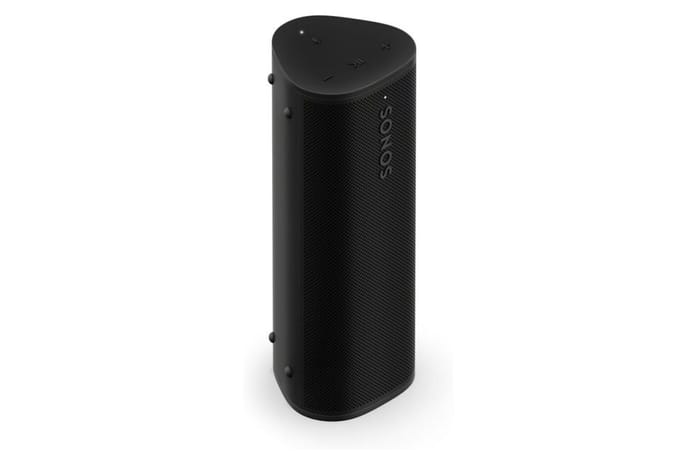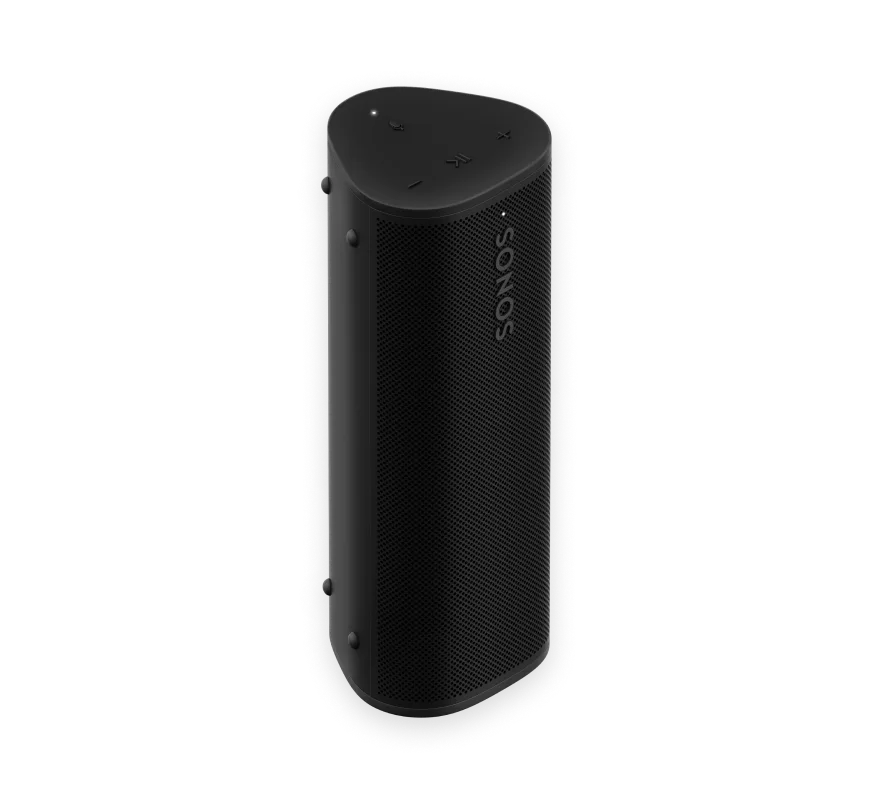
The Sonos Roam 2 makes sense when you want one small speaker to move between a Sonos home system and Bluetooth-only listening away from Wi-Fi. It is light, rugged, and simple to pair, but the compact cabinet cannot produce the bass, stereo width, or louder output of a larger portable speaker. Sonos rates it for up to 10 hours, and the official design is IP67. Those are useful starting points, not a promise that every owner will get the same runtime or outdoor volume.
Table of Contents
Is the Sonos Roam 2 a Sonos speaker that actually travels?
Roam 2 is most compelling for a household already invested in Sonos. At home, it can behave like a small Sonos speaker over Wi-Fi; at a park, hotel, or campsite, its dedicated Bluetooth button makes direct phone pairing much less fussy than on the first model. Sonos's Roam 2 guide documents both connection paths, while RTINGS' exact-model review finds clear midrange but limited low bass and insufficient output for a large room.
| Best for | Sonos homes that also need a small Bluetooth speaker for travel |
|---|---|
| Strongest feature | The split personality: Sonos Wi-Fi features at home and straightforward Bluetooth away |
| Main compromise | Small-speaker bass and volume, plus no independent stereo from one unit |
| Buy when | You will use Sonos grouping or AirPlay at home and value a rugged 0.95-pound body |
| Skip when | You need party volume, deep bass, or a cheaper standalone Bluetooth speaker |
How does Roam 2 compare with the original Roam and Roam SL?
Do not treat Roam 2 as a completely different speaker. The basic portable format, Wi-Fi/Bluetooth idea, waterproof enclosure, and size remain familiar. The practical hardware change is a dedicated Bluetooth pairing button. That button addresses one of the original Roam's awkwardest travel moments: getting a phone connected without first opening the Sonos ecosystem.
WIRED's exact Roam 2 review describes the exterior and general functions as very similar to the first generation, while reporting easier pairing and good sound for the size. The review also says Sonos addressed the first model's battery-drain complaints, but it did not establish long-term battery endurance. Roam 2 may be the safer new purchase, but a used first-generation Roam is not automatically unusable.
RTINGS identifies another generation difference: Google Assistant is no longer supported on Roam 2, while Alexa and Sonos voice control remain available under their supported connection conditions. If Google Assistant is essential to your setup, check the current Sonos support position before buying rather than assuming the assistant list stayed unchanged.
How does Roam 2 Bluetooth mode work away from Wi-Fi?
Roam 2 can play as a normal Bluetooth speaker when there is no Wi-Fi. Press the dedicated Bluetooth button, select Roam 2 in the phone's Bluetooth menu, and start playback. Sonos lists a Bluetooth range of up to 30 feet or 9 metres under its stated conditions; walls and interference can shorten that distance.
Bluetooth mode is intentionally simpler than Wi-Fi mode. The phone is the source, and you should not expect every Sonos app, multiroom, or voice feature to follow you offline. Sonos says voice control has limited playback controls over Bluetooth, and a single Bluetooth source is the sensible expectation. This is a good fit for a picnic playlist or a hotel room. It is not the same as taking a complete, phone-independent Sonos system outside.
The dedicated button is especially valuable for occasional use. Someone can pair a phone directly without learning your home Sonos account, and you can switch back to the home network later. If several people will take turns controlling the speaker, remember that normal Bluetooth hand-offs still depend on the phones and their pairing state.
What do Wi-Fi and the Sonos app add to Roam 2?
On Wi-Fi, Sonos's documentation lists AirPlay 2, grouping with compatible Sonos products, voice control, EQ, Sonos Radio, and Auto Trueplay. Wi-Fi is also the path for Sound Swap, which moves playback to a nearby compatible Sonos speaker. These features are the reason to pay more for Roam 2 over a generic IP-rated portable speaker.
The tradeoff is setup and ecosystem dependence. You need the Sonos app and a network for the smart-speaker features, and some controls vary between Wi-Fi and Bluetooth. Auto Trueplay also requires the app and registration. Buyers who only want to press play from a phone may find the setup unnecessary; Sonos owners will likely see the same requirements as familiar rather than burdensome.
Roam 2 is not a stand-alone stereo pair by itself. Sonos says stereo pairing requires two speakers of the same type and a suitable listening arrangement. RTINGS also rates one unit as a centered, non-omnidirectional speaker rather than a room-wide stereo system. A second Roam 2 can solve width in a fixed setup, but it doubles the cost and charging responsibilities.
How big and heavy is Roam 2, and what does IP67 protect?
According to the Sonos support and setup information, Roam 2 weighs 0.95 pounds and measures 6.61 x 2.44 x 2.36 inches. It is narrow enough for a side pocket and light enough to carry with a laptop or camera, but it is not a key-fob speaker. Leave room around the controls and charging port instead of burying it in a packed bag.
The IP67 rating covers dust and temporary water immersion under test conditions. Sonos describes the body as waterproof and dustproof; close the port cover before exposure, rinse off grit, and let the speaker dry before charging. IP protection does not prevent scuffs, a cracked enclosure, or battery aging. WIRED specifically noticed that the finish can collect smudges and scratches, which is a more realistic travel caveat than treating the rugged rating as indestructible.
Is Roam 2 sound quality clear enough for a party?
Roam 2's size gives it a useful voice-and-music balance, but there is no acoustic shortcut around a small enclosure. RTINGS reports a flat midrange and clear dialogue while finding limited low-bass extension. It also says the speaker is not loud enough for a large room. That makes Roam 2 well suited to a desk, kitchen, bedside table, or close group of listeners, rather than a crowded patio.
WIRED's review is more enthusiastic about the bass and overall balance for the dimensions, but its conclusion also stops short of calling Roam 2 a party speaker. Those descriptions can coexist: a compact speaker can sound surprisingly full at normal listening distance while losing authority when you push it across a noisy outdoor space.
Use the Sonos app's EQ and Auto Trueplay on Wi-Fi if you need to adjust the result. There is no reason to expect the same tuning controls in every Bluetooth-only situation. If deep movie effects or bass-heavy music are the priority, a larger portable speaker or a home subwoofer is a better direction. The Move 2 versus Roam 2 guide is the more useful comparison when portability and bass are pulling you in opposite directions.
How long does the Roam 2 battery last, and how does it charge?
Sonos rates Roam 2 for up to 10 hours of playback and lists an 18 Wh battery. Volume, content, wireless mode, voice features, temperature, and battery age all affect runtime. The rating is useful for comparing product classes, but it is not a guarantee of 10 hours at high volume outdoors.
Charging is through USB-C, and Sonos also supports optional wireless charging accessories. Pack a suitable power source for travel and keep the port dry. If you are buying an older or open-box unit, use the return window to check charging behavior and real playback time.
What are the important limitations of Roam 2?
Roam 2 is not the right tool for every Sonos owner. One unit has limited low bass, no independent left/right stereo, and modest maximum loudness. Bluetooth gives you portability, but it also removes much of the convenience that makes Sonos different. Google Assistant support is not part of this generation according to RTINGS, and the finish may show travel wear.
Recent exact-model owner reporting is limited, so scattered comments about the original Roam do not add up to a Roam 2 reliability consensus. The strongest evidence here is the manufacturer's current documentation and two independent exact-model reviews. That is enough to set expectations about connections, sound, and physical design; it is not enough to promise a particular battery lifespan for every unit.
Should I buy Roam 2 or an alternative portable speaker?
Choose Roam 2 when the Sonos ecosystem is part of the requirement. The Sonos Era 300 review is relevant for a much larger home speaker with spatial-audio ambitions, while Roam 2 is the portable endpoint. The Sonos Move 2 review covers the step-up option when you want more authority and can accept a heavier body.
Choose another portable Bluetooth speaker when Wi-Fi grouping, AirPlay 2, and Sonos control do not matter. In that case, money can go toward a larger driver, longer practical battery, or a simpler app-free setup. Roam 2's price pays for those two connection modes, not for loudness per dollar.
The purchase test is simple: will the speaker spend meaningful time on a Sonos network, and will you actually carry it away from that network? If the answer to both is yes, Roam 2 has a clear job. If the answer to the first is no, compare ordinary Bluetooth models before paying for ecosystem features you will not use.
Frequently Asked Questions
Can Sonos Roam 2 work without Wi-Fi?
Yes. Use the dedicated Bluetooth button to pair a phone directly. The broader Sonos app and multiroom features need Wi-Fi.
Is Roam 2 better than the original Roam?
It is easier to pair over Bluetooth and changes the supported voice-assistant mix. The basic size and concept are similar, so do not expect a wholly new sound or a large-speaker upgrade.
Is Sonos Roam 2 waterproof?
Sonos lists an IP67 rating. Close the port cover and allow the speaker to dry before charging after exposure to water.
How long does Roam 2 last on a charge?
Sonos rates it for up to 10 hours. Actual runtime changes with volume, content, connection mode, temperature, and battery age.
How portable is the Sonos Roam 2 for travel?
Roam 2 is a small speaker for trips, parks and hotel rooms. Its weight, battery and range decide how well it fits that role.
- Roam 2 weighs 0.95 pounds, light enough to carry with a laptop or camera. (support.sonos.com)
- It is 6.61 x 2.44 x 2.36 inches, narrow enough for a bag side pocket. (support.sonos.com)
- Sonos rates up to 10 hours of playback, but high volume outdoors can cut that.
- The 18 Wh battery charges over USB-C, with optional wireless charging accessories.
- Bluetooth reaches up to 30 feet or 9 metres, so keep your phone close.